
Manage Scenarios
Manage a scenario by clicking the 3-dot menu to the right of the scenario name in the left-hand panel.
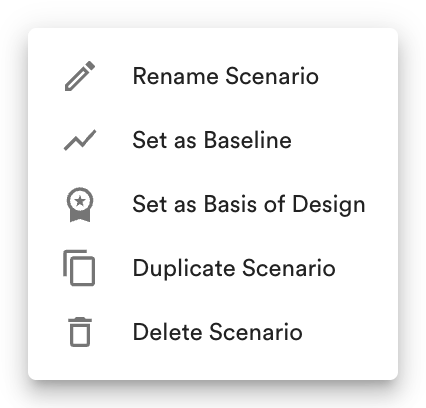
Manage a scenario.
The baseline scenario's menu has only Rename Scenario and Duplicate Scenario.
Rename a Scenario
Section titled “Rename a Scenario”Within the menu, click Rename Scenario.
Modify the scenario's name and click Rename.
Set as Baseline
Section titled “Set as Baseline”Within the menu, click Set as Baseline to make the scenario the project's reference for comparison. See Set a Baseline.
Set as Basis of Design
Section titled “Set as Basis of Design”Within the menu, click Set as Basis of Design to make the scenario the Basis of Design for its project phase. On the Basis of Design scenario, this item reads Remove Basis of Design. See Set Basis of Design Scenario.
Duplicate a Scenario
Section titled “Duplicate a Scenario”Duplicating a scenario creates a new scenario with the same carbon reduction measures as the original, which is useful when building a sequence of strategies where each builds on the last.
Within the menu, click Duplicate Scenario.
The duplicated scenario appears with "(copy)" at the end of its name.
Delete a Scenario
Section titled “Delete a Scenario”Within the menu, click Delete Scenario.
Confirm you would like to delete the scenario by clicking Delete.